
Abroad, the thing you look forward to most is usually the food. Eating like a local, tasting the real, everyday dishes you've never had before.
But when you actually sit down, two pieces of paper stand between you and that meal, and you can't read either one.
The first: a menu you can't read
The menu is a wall of letters you can't read. With no photos, all you can do is pull out your phone and translate dish by dish, trying to work out what each one is.
“I'll have this one, the stir-fried pork with chives and bean sprouts.”
“Wait, which one is that? I can't read a word on the menu.”
Ordering turns into a gamble. Sometimes you win. Sometimes… you get the mudfish.
The time we ordered mudfish
It was a little izakaya. Everything we'd ordered so far was great, so we wanted one more fried dish to go with the drinks, and picked the one that looked most impressive.
We thought it was fried chicken. It came out looking like a few little fish, not very satisfying, and we all went back to missing the karaage.
It wasn't until the whole meal was over, and we looked it up, that we found out: deep-fried mudfish.
It's a funny story now. But if we'd known at the time, we'd have just swapped it for a different fried dish.
Snap one photo, and pick with confidence
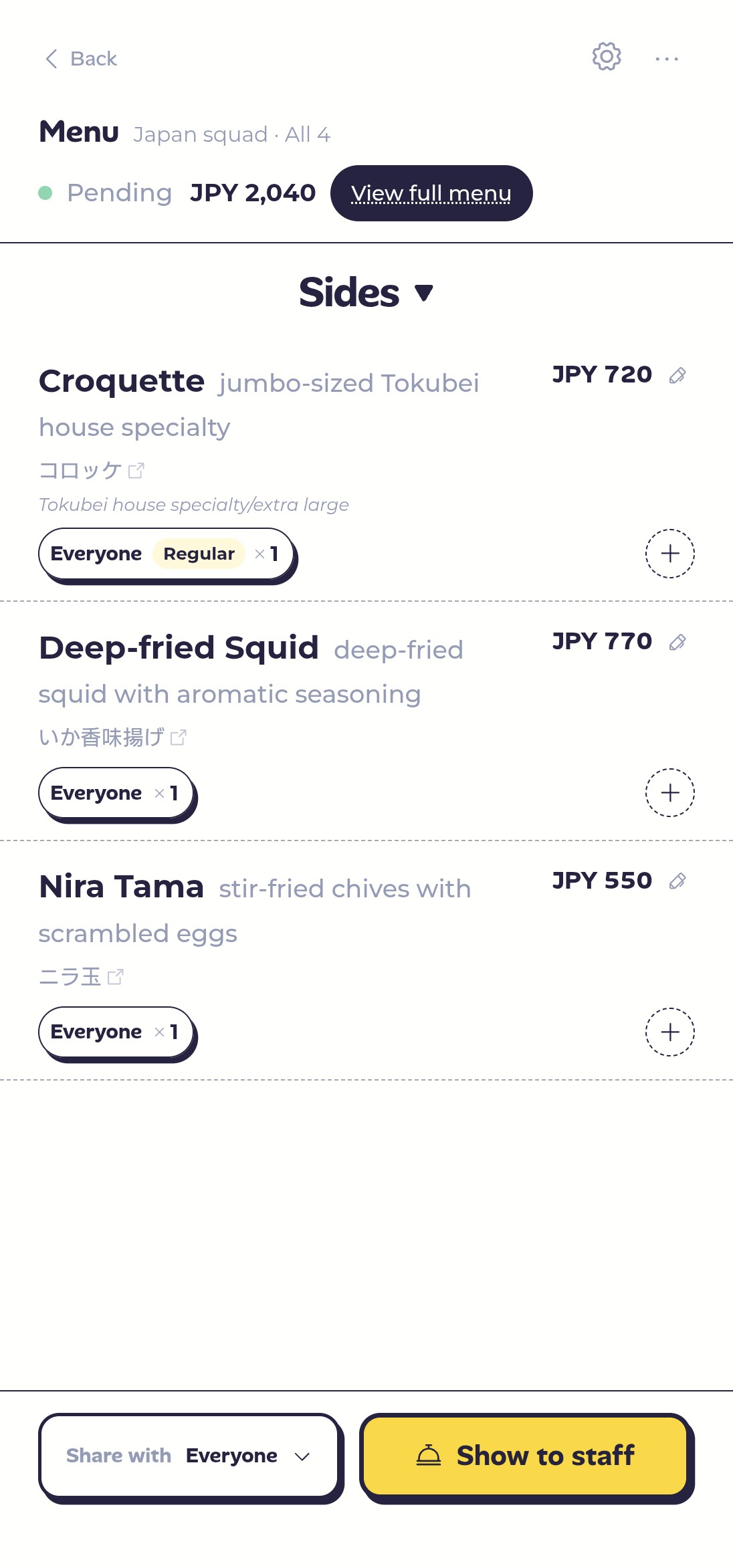
Chillwari's Pic'n Pick starts with one photo of the menu. It translates the whole thing into a language you can read and turns it into a list the table can order from together. For local specialties with a backstory or a pun in the name, it adds a plain-language note.
Want to know more? Long-press a dish. It'll tell you what it actually tastes like, the texture, and when it's good to order.
That's exactly what the name means: snap a pic, see what it is, then pick. That plate of “mudfish” stops being a mystery you solve after the meal. Skip it, or order it on purpose. This time, the venture is one you chose.
Japanese, Thai, Korean, Chinese, even a handwritten board at a hole-in-the-wall, let it have a go. It does more than look up words; it reads the whole dish for you.
The second: a receipt you can't read
It's a shared meal, so someone wants an extra drink, someone wants another dessert. Then you pay, the receipt lands on the table, and the second piece of paper you can't read shows up.
Pic'n Pick already handled the menu.
What about the receipt?
How to split is up to you
Every group has its own habit, and whether the food is shared or ordered individually changes things too: maybe everyone splits evenly, maybe everyone pays their own. Pic'n Pick does both.
Everyone splits evenly
If the food is shared, splitting evenly is easiest. Keep every dish on “Everyone,” and at checkout Chillwari splits the total evenly for you. No math.
Or simpler still: use it purely as a “read the menu + order together” tool, close the session when you're done, and split the receipt the way you always do.
Everyone pays their own
Someone's not drinking, someone wants an extra of their own, or a dish is just for one person. That's when paying separately feels easier.
When you order, pick who shares each dish: only yours goes on “just me”; a starter for two goes to those two; a dish for the whole table goes on “Everyone.” Who ordered what, and with whom, is recorded from the start, and Chillwari works out how much each person owes.
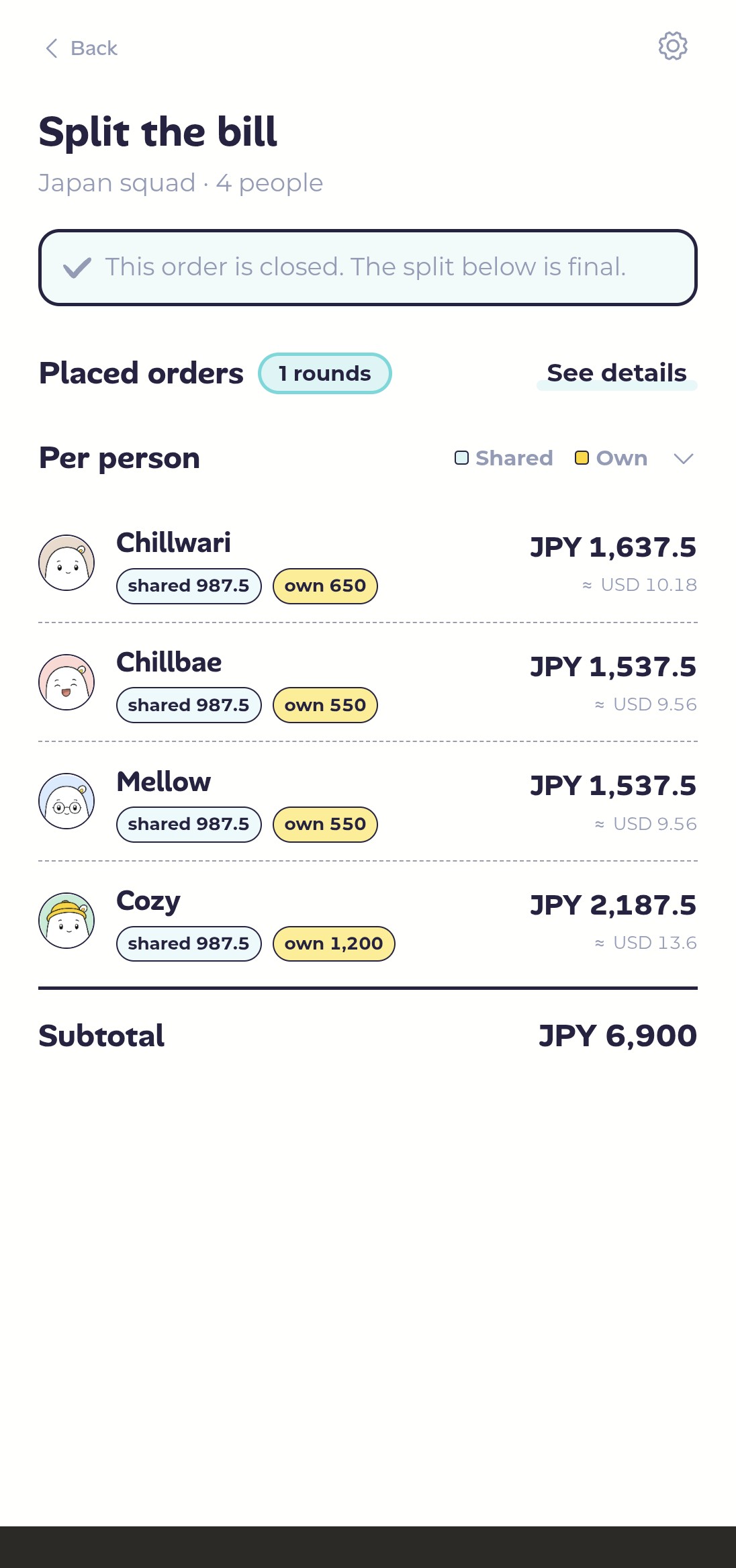
Shared is shared, yours is yours. How you split, your table decides.
Just want to split the bill and skip the ordering? Receipteller reads the receipt and splits it by what you say.
Start before you even walk in
The waiter standing there with a pad while you can't read the menu is real pressure. Here's a calmer way: screenshot the menu and upload it before you walk in.
On the train, in the queue, once you've sat down, everyone can browse the dishes and pick ahead: tag your own on “just me,” the shared plates on “Everyone,” and decide as you go. The moment the waiter reaches your table, the whole order is ready. Just show them the Pic'n Pick screen and wait to eat.
Give eating back to your trip
On your next trip, order what you can read, eat what you actually want, and split the bill however your group likes.